
On this page
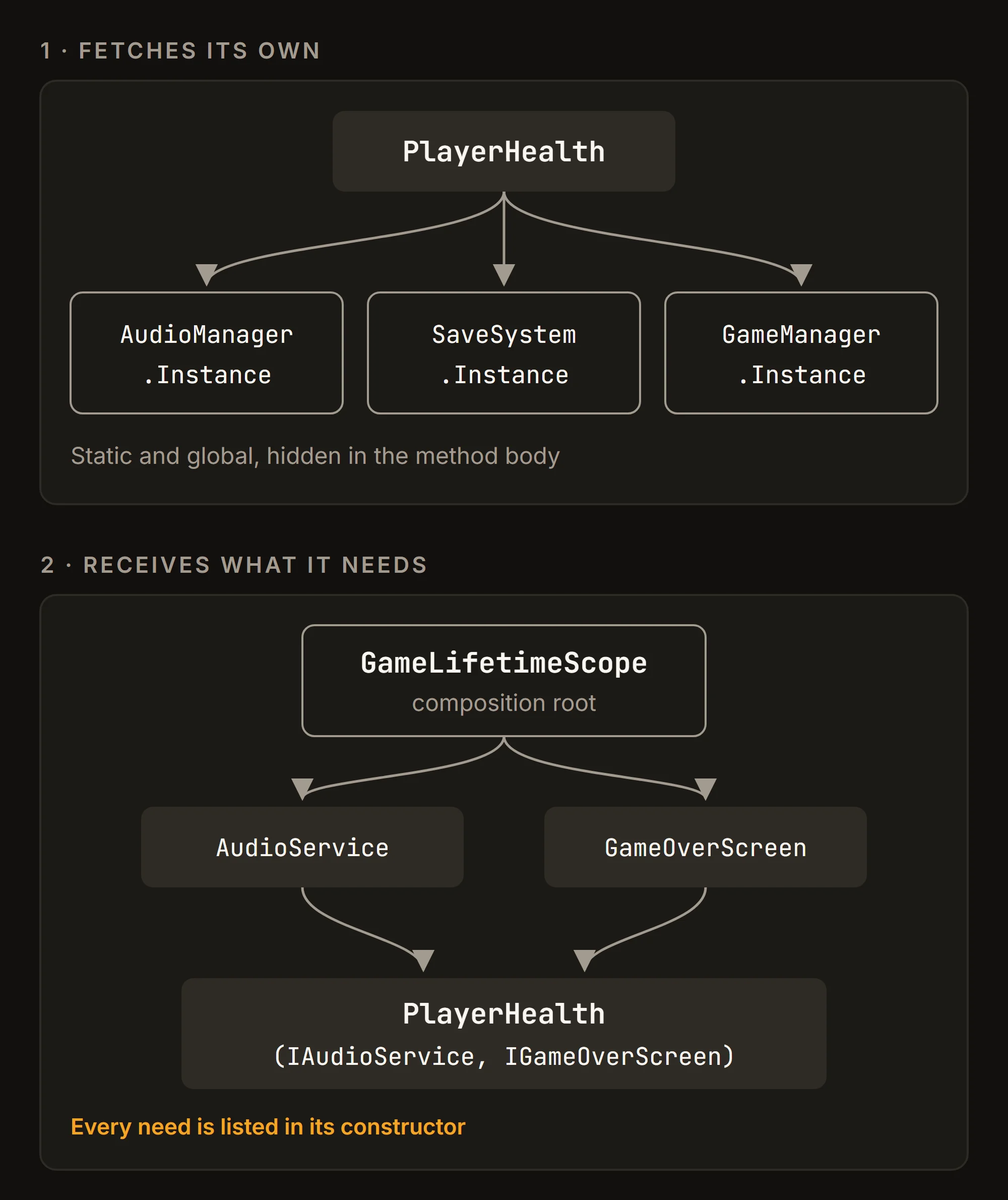
It starts with one GameManager.Instance. It takes five minutes, it works, and nobody gets hurt. Then come AudioManager.Instance, SaveSystem.Instance and UIManager.Instance, each called from everywhere, and one day you cannot test the player's health without booting half the game.
Dependency Injection (DI) turns the question around: a class says what it needs, and something else hands it over. By the end, you will know what DI is, how it compares with singletons, service locators and ScriptableObjects, and how to wire a small scene with VContainer, including a test that runs without Play mode.
Written for Unity 6.3 LTS (6000.3) and VContainer 1.19.0, released in July 2026. VContainer itself requires Unity 2018.4 or later.
Why Instance everywhere hurts
Here is a player that takes damage, written the way most of us wrote it the first time:
public class PlayerHealth : MonoBehaviour
{
    int hp = 100;

    public void TakeDamage(int amount)
    {
        hp -= amount;
        AudioManager.Instance.Play("hurt");

        if (hp <= 0)
        {
            SaveSystem.Instance.RecordDeath();
            GameManager.Instance.ShowGameOver();
        }
    }
}
It reads fine. The trouble is what it does not say:
- Hidden dependencies. Nothing outside the method body says this class needs three managers. You find out by reading every line, or from a
NullReferenceExceptionin a scene that lacks one of them. - No seams for tests. To check that lethal damage shows the game over screen, you need a real audio manager, save system and game manager in a scene. Testing one class means booting a small game.
- State that outlives Play mode. If you disable domain reloading to enter Play mode faster, the manual warns that "static variables keep their values between Play mode sessions". Your static
Instancefrom the last run is still there, pointing at an object that no longer exists.
The class is not wrong because it uses managers. It is hard to change because it fetches them itself, so every scene and every test inherits that choice.
What Dependency Injection actually means
DI means a class receives what it needs from the outside instead of fetching it. The VContainer docs put it plainly: "The only way to exclude an unconcerned dependency from a class is to pass it in from outside." In C#, the simplest way in is the constructor:
public interface IAudioService { void Play(string clipId); }
public interface IGameOverScreen { void Show(); }

public class PlayerHealth
{
    readonly IAudioService audio;
    readonly IGameOverScreen gameOver;

    public int Hp { get; private set; } = 100;

    public PlayerHealth(IAudioService audio, IGameOverScreen gameOver)
    {
        this.audio = audio;
        this.gameOver = gameOver;
    }

    public void TakeDamage(int amount)
    {
        Hp -= amount;
        audio.Play("hurt");
        if (Hp <= 0) gameOver.Show();
    }
}
No framework yet, and no MonoBehaviour either. PlayerHealth lists its needs in one place, and it asks for interfaces, so a real audio system, a muted one or a test fake all fit. I dropped the save system to keep the example short; it would be one more constructor parameter.
Someone still has to call new. That place is the composition root: one spot, usually at startup, where the whole object graph is built. With three classes you can write it by hand, new PlayerHealth(new AudioService(), gameOverScreen). With sixty, the hand-written root turns into a wall of new calls that must run in the right order. That is the job of a DI container: you register each type once, and it works out what to create and when. VContainer's docs call this auto-wiring.
How singletons, service locators and ScriptableObjects compare
Unity projects usually share services in one of four ways. The difference is who does the fetching:
| Approach | How a class gets it | Swap in a test |
|---|---|---|
| Singleton | Audio.Instance | Hard |
| Service Locator | Services.Get<IAudio>() | Global swap |
| ScriptableObject | Inspector field | Swap the asset |
| DI | Constructor | Pass a fake |
Singleton. One static instance that everyone can reach. It is quick to write and fine for a jam game, and it is exactly what Microsoft's .NET DI guidelines warn against: "Avoid static access to services." The same page sums up the relationship: "DI is an alternative to static/global object access patterns." A DI container's Singleton lifetime is a different thing: one instance that the container creates and hands out, not a static field.
Service Locator. A registry you ask for things: Services.Get<IAudio>(). It fixes swapping (register a fake before the test runs) but not visibility. Martin Fowler, comparing both patterns in 2004, named the cost: "with a Service Locator every user of a service has a dependency to the locator." He also judged that the choice between the two "is less important than the principle of separating service configuration from the use of services". Microsoft's guidelines are blunter: "Avoid using the service locator pattern."
ScriptableObject. Unity's own tool for shared data: an asset that many objects reference, so that "there is one copy of the data in memory". For configuration (move speeds, prices, wave tables) it is excellent, and dragging an asset into an Inspector field already is a kind of injection. It gets awkward as runtime state: in the Editor "you can save data to ScriptableObjects in Edit mode and Play mode", so a value your code changes during play is not reset when you press Stop (enjoy your player who now starts every session with 3 HP), while a standalone build "can only read saved data".
DI. The class declares its needs and the composition root supplies them. These are not rivals: VContainer shows how to register ScriptableObject settings with RegisterInstance, after which classes receive them like any other dependency. ScriptableObjects hold data; DI does the wiring.
Your first LifetimeScope
Installing VContainer
Install VContainer from OpenUPM, which its docs call the preferred method, with openupm add jp.hadashikick.vcontainer. Without the OpenUPM CLI, add this entry to dependencies in Packages/manifest.json:
{
  "dependencies": {
    "jp.hadashikick.vcontainer": "https://github.com/hadashiA/VContainer.git?path=VContainer/Assets/VContainer#1.19.0"
  }
}
The composition root
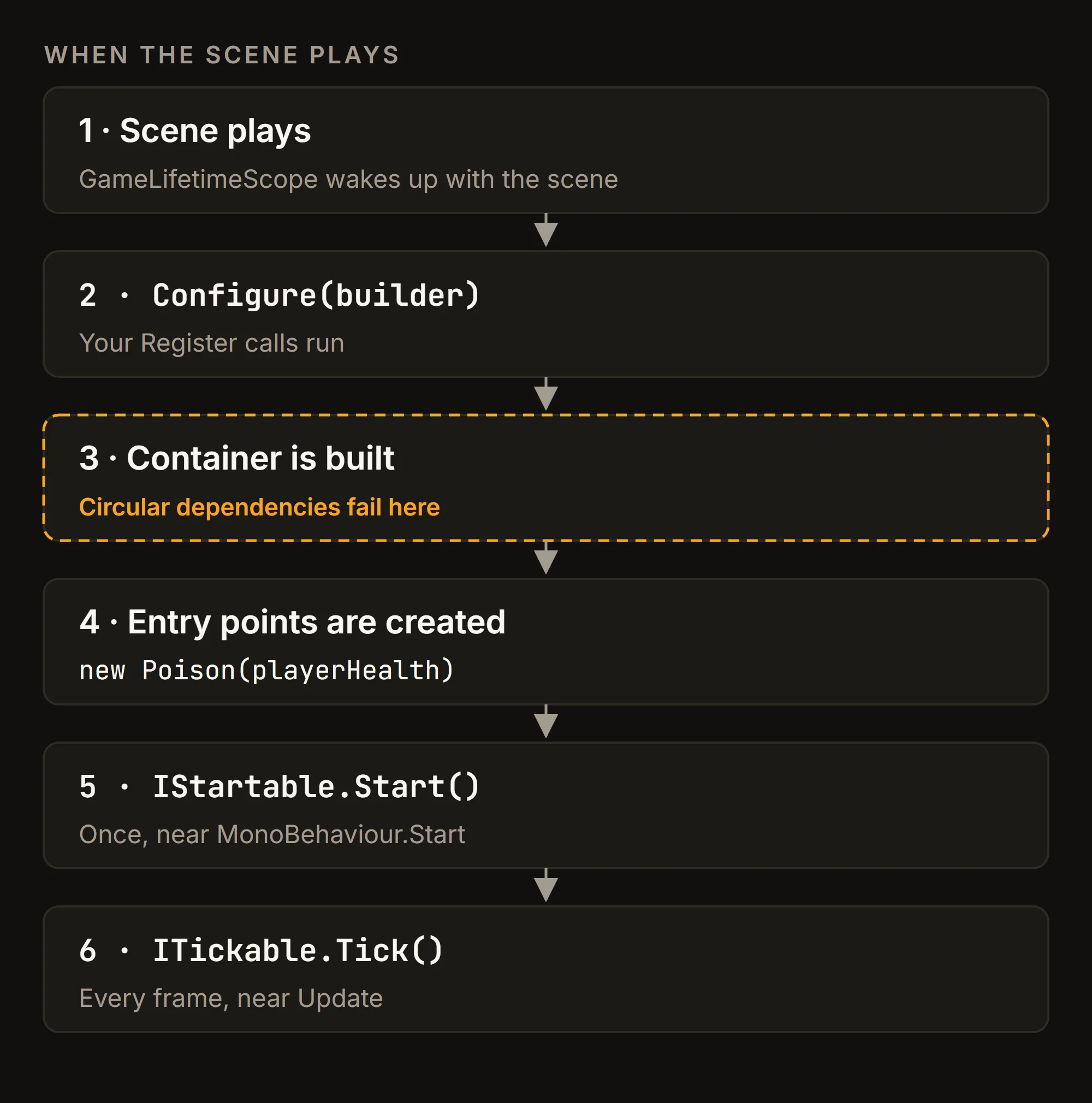
In VContainer, the composition root is a LifetimeScope: a component you subclass, add to an empty GameObject in the scene, and fill in Configure. When the scene plays, it builds its container and starts your entry points.
using UnityEngine;
using VContainer;
using VContainer.Unity;

public class GameLifetimeScope : LifetimeScope
{
    [SerializeField] GameOverScreen gameOverScreen;

    protected override void Configure(IContainerBuilder builder)
    {
        builder.Register<IAudioService, AudioService>(Lifetime.Singleton);
        builder.Register<PlayerHealth>(Lifetime.Singleton);
        builder.RegisterComponent<IGameOverScreen>(gameOverScreen);
        builder.RegisterEntryPoint<Poison>();
    }
}
Register<IAudioService, AudioService> reads as "whoever asks for IAudioService gets an AudioService". Register has no default lifetime: you pick one every time, which the getting-started guide says is for "transparency and consistency". RegisterComponent hands an existing scene object to the container: here, the GameOverScreen field. The example assumes AudioService is a plain class that implements IAudioService, and GameOverScreen is a MonoBehaviour that implements IGameOverScreen.
Entry points: logic without a GameObject
Poison is the fun part: game logic that runs every frame with no GameObject in sight.
using UnityEngine;
using VContainer.Unity;

public class Poison : ITickable
{
    readonly PlayerHealth health;
    float timer;

    public Poison(PlayerHealth health) => this.health = health;

    void ITickable.Tick()
    {
        if (health.Hp <= 0) return;
        timer += Time.deltaTime;
        if (timer < 1f) return;
        timer -= 1f;
        health.TakeDamage(1);
    }
}
The Hp check is there because a poison that keeps ticking after death shows the game over screen once a second, forever. RegisterEntryPoint registers the class (as a Singleton unless you pass another lifetime) and schedules its marker interfaces on Unity's player loop: IStartable.Start runs at nearly the same time as MonoBehaviour.Start, and ITickable.Tick alongside Update. Game rules move into plain C# classes, and MonoBehaviours go back to being the view.
Injecting into MonoBehaviours and prefabs
Unity creates MonoBehaviours itself, so you cannot use their constructors. VContainer injects them through a method marked [Inject], which "can have any name and any accessibility level":
using UnityEngine;
using VContainer;

public class Enemy : MonoBehaviour
{
    PlayerHealth player;

    [Inject]
    void Construct(PlayerHealth player) => this.player = player;

    void OnCollisionEnter(Collision collision)
    {
        if (collision.gameObject.CompareTag("Player"))
            player.TakeDamage(10);
    }
}
The attribute alone does nothing: the docs stress that [Inject] "does not imply that it will automatically be called". A MonoBehaviour gets injected in one of three ways:
- Auto Inject Game Objects: list a GameObject in this field on the
LifetimeScopeInspector, and its MonoBehaviours and children are injected when the scope starts. - Registered components: anything registered with
RegisterComponentand its siblings is both injected and injectable, likeGameOverScreenabove. IObjectResolver.Instantiate: for everything spawned at runtime.
Spawning prefabs at runtime
The third one is where people get bitten. Here is a spawner done right:
using UnityEngine;
using VContainer;
using VContainer.Unity;

public class EnemySpawner : IStartable
{
    readonly IObjectResolver resolver;
    readonly Enemy prefab;

    public EnemySpawner(IObjectResolver resolver, Enemy prefab)
    {
        this.resolver = resolver;
        this.prefab = prefab;
    }

    void IStartable.Start()
    {
        resolver.Instantiate(prefab, new Vector3(0f, 0f, 10f), Quaternion.identity);
    }
}
Register it with builder.RegisterEntryPoint<EnemySpawner>().WithParameter(enemyPrefab);, where enemyPrefab is another serialized field on the scope. WithParameter supplies a constructor argument that is not registered in the container.
Now swap resolver.Instantiate for Unity's Object.Instantiate. The enemy spawns, walks up to the player, and throws a NullReferenceException on contact, because nobody called Construct. The bug shows up late and far from its cause.
resolver.Instantiate also injects before the clone wakes up: in VContainer's source it deactivates the prefab, instantiates it, injects the clone, then reactivates both. For an active prefab, Awake and OnEnable already see their dependencies.
Lifetimes and scopes
Three lifetimes
Each registration has one of three lifetimes, as the lifetime overview defines them:
- Singleton: one instance for the container and its children. Not a static field: when its
LifetimeScopeis destroyed,Dispose()is called if it implementsIDisposable. - Transient: a new instance every time it is resolved.
- Scoped: one instance per
LifetimeScope, so each child scope gets its own.
A tree of scopes
Scopes form a tree, and lookups only go up: if a scope has no registration for a type, it asks its parent. That fits how games are shaped. Session-wide services (audio, saves, the player's profile) go in a root scope, and each scene gets a scope below it for what belongs to that scene. A scene service can use the audio service; the audio service cannot reach into a scene. Once you have a root scope, the IAudioService registration moves there from GameLifetimeScope.
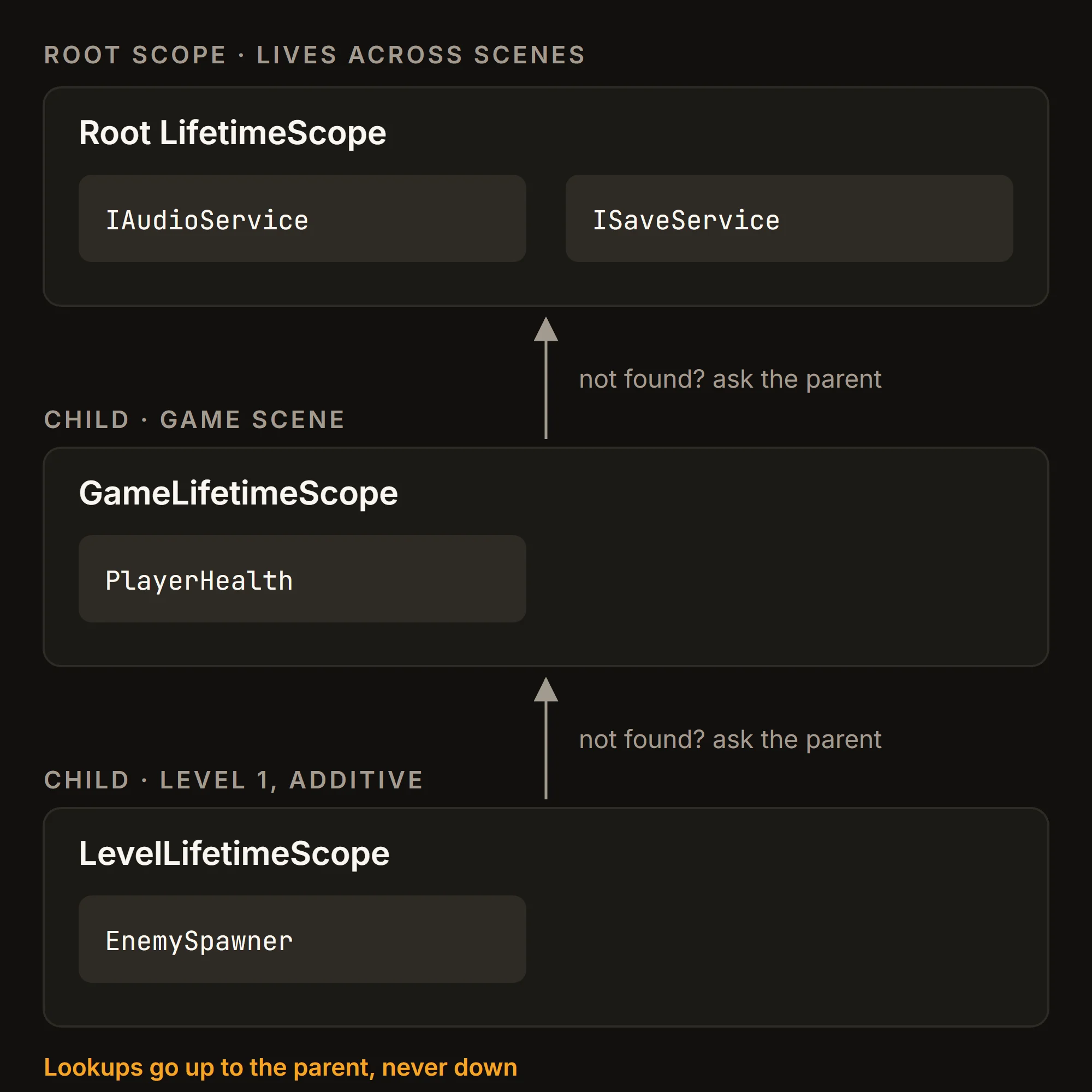
To set the root scope, make a prefab with your root LifetimeScope, create Assets > Create > VContainer > VContainer Settings, and set the prefab as Root Lifetime Scope. VContainer creates it once and marks it DontDestroyOnLoad, as its settings code shows.
Additive scenes
For a scene loaded additively, choose its parent in code with EnqueueParent. A LifetimeScope created inside the using block, like the level's LevelLifetimeScope in the diagram, gets that parent. This coroutine needs the System.Collections, UnityEngine.SceneManagement and VContainer.Unity namespaces:
IEnumerator LoadLevel(LifetimeScope parentScope)
{
    using (LifetimeScope.EnqueueParent(parentScope))
    {
        yield return SceneManager.LoadSceneAsync("Level1", LoadSceneMode.Additive);
    }
}
When that level unloads, its scope goes with it and calls Dispose() on the objects it registered that implement IDisposable, so plain C# services clean up without an OnDestroy. One caveat from the lifetime overview: if you destroy a scope while its scene stays loaded, MonoBehaviours it registered as Scoped stay alive unless they sit under the scope's transform.
Testing without Play mode
Because PlayerHealth asks for interfaces, a test can hand it fakes. No scene, no VContainer, no Play mode:
using NUnit.Framework;

public class PlayerHealthTests
{
    class FakeAudio : IAudioService
    {
        public void Play(string clipId) { }
    }

    class FakeGameOver : IGameOverScreen
    {
        public bool Shown;
        public void Show() => Shown = true;
    }

    [Test]
    public void LethalDamageShowsGameOver()
    {
        var gameOver = new FakeGameOver();
        new PlayerHealth(new FakeAudio(), gameOver).TakeDamage(100);

        Assert.IsTrue(gameOver.Shown);
    }
}
This is an Edit Mode test for the Unity Test Framework. VContainer's constructor injection page lists this as a reason to prefer constructors: "you can even instantiate it without using VContainer (e.g. for testing)."
Try writing the same test for the first PlayerHealth. You would need three managers in a scene, and a way to stop SaveSystem from recording a death on disk every time the tests run.
Mistakes that bring the singletons back
- A missing registration. If a constructor needs a type nobody registered, VContainer throws
No such registration of typewhen it tries to create that object. Entry points and registered components are created right after the container is built, so their mistakes show up when the scene starts. A class first needed later, say by an enemy spawned ten minutes into a level, fails ten minutes into the level. - A circular dependency. If
AneedsBandBneedsA, the container build fails withCircular dependency detected!and the path between them. One way out is to move the part both need into a third class. Resolveeverywhere. InjectingIObjectResolverand callingResolve<T>()from game code is a service locator in a nicer suit. The container API page says you should only needResolvewhen the other injection techniques "don't fit your needs".Instantiatein a spawner is fine: it is the documented way to inject runtime prefabs.- Code stripping in builds. Unity's linker can remove constructors that look unused, and VContainer reaches them through reflection. Mark one constructor with
[Inject], or keep the type in a link.xml file. - Expecting cleanup from
RegisterInstance. Objects passed to it are not managed by the container: no automaticDispose, no method injection. UseRegisterwith a factory orRegisterComponentwhen you want both.
When DI is not worth it
This part is my opinion. For a game jam or a two-day prototype, Instance is fine: the code will not live long enough for its costs to arrive. DI pays off in projects that grow for months, get touched by several people, or need tests.
It is not free. Newcomers have one more concept to learn, the registrations are code you maintain, and VContainer resolves through reflection by default. If that shows up in your profiling, it offers a Roslyn source generator (Unity 2021.3 or later) that replaces it.
Most of the value also comes before any library. The constructor-based PlayerHealth above is already testable, with a hand-written composition root. A container is what keeps that habit affordable at sixty classes.
Checklist
- Give each class its dependencies through the constructor, as interfaces; keep
Instanceout of new code. - Put one
LifetimeScopein each scene, and session-wide services in a root scope set in VContainer Settings. - Write game rules as plain C# entry points (
IStartable,ITickable) and let MonoBehaviours be views injected through[Inject]. - Spawn prefabs that need dependencies with
resolver.Instantiate, neverObject.Instantiate. - Keep
Resolveout of game code. When a constructor grows long, split the class: Microsoft's guidelines treat many injected dependencies as a sign that a class "has too many responsibilities".