
On this page
Picture a survivor-style game: the player stands in an arena and thousands of enemies walk toward them from every side. The obvious first version gives each enemy a GameObject with a small MonoBehaviour that moves it in Update. As the horde grows, so does the main thread's share of every frame.
This post shows how Unity's Entity Component System (ECS) handles the same horde: why the GameObject version slows down, how ECS stores the enemies, and how to spawn, move and remove them with jobs and Burst. It ends with lighter alternatives.
The code is written for Unity 6.3 LTS with Entities 1.5 and Entities Graphics 1.5 on URP, the versions released for that Editor. From Unity 6.4, Entities is a core package whose version matches the Editor.
Why thousands of GameObjects get slow
The usual enemy script looks harmless:
public class ChasePlayer : MonoBehaviour
{
    public Transform player;
    public float speed = 3f;

    void Update()
    {
        var direction = (player.position - transform.position).normalized;
        transform.position += direction * speed * Time.deltaTime;
    }
}
The math is cheap. The cost is around it. The engine calls every Update from native code, and Unity's manual on using a custom update manager says "there is a small but significant overhead to invoking managed-code callbacks from native code". The same page suggests a different approach once the number of MonoBehaviour instances with per-frame callbacks "reaches the hundreds or thousands". A horde reaches that count in the first wave.
Two more things stay the same no matter how you tune the script. Every enemy runs on the main thread, one after another, while the other CPU cores wait. And each enemy's data lives in its own objects, so one pass over the horde visits thousands of separate objects instead of reading one block of data.
ECS changes all three: no per-enemy callback, work spread over worker threads, and the enemy data packed together.
The ECS mental model
ECS splits an object into data and logic, and keeps them apart:
- Entity: in the Entities documentation, "a unique identifier, like a lightweight unmanaged alternative to a GameObject". An entity has no code.
- Component: a plain struct of data that implements
IComponentData, such as a speed or a position. - System: the logic. It finds every entity with a given set of components and updates them, once per frame for all of them, not once per entity.
- World: the container for entities and systems. Everything in this post runs in the default world.
For the horde, the components that matter are Enemy (a tag component with no data), MoveSpeed and LocalTransform (position, rotation and scale). The entity carries more, such as LocalToWorld and what Entities Graphics needs to draw it, but the game code only touches these three. One ChaseSystem moves every enemy.
Archetypes and chunks
The speed of ECS comes from how it stores components. Every entity with the exact same set of component types shares an archetype. The archetypes page explains that all entities of one archetype are stored in uniform blocks of memory called chunks, 16 KiB each. Inside a chunk, each component type has its own array, so the LocalTransform values of the enemies sit next to each other.
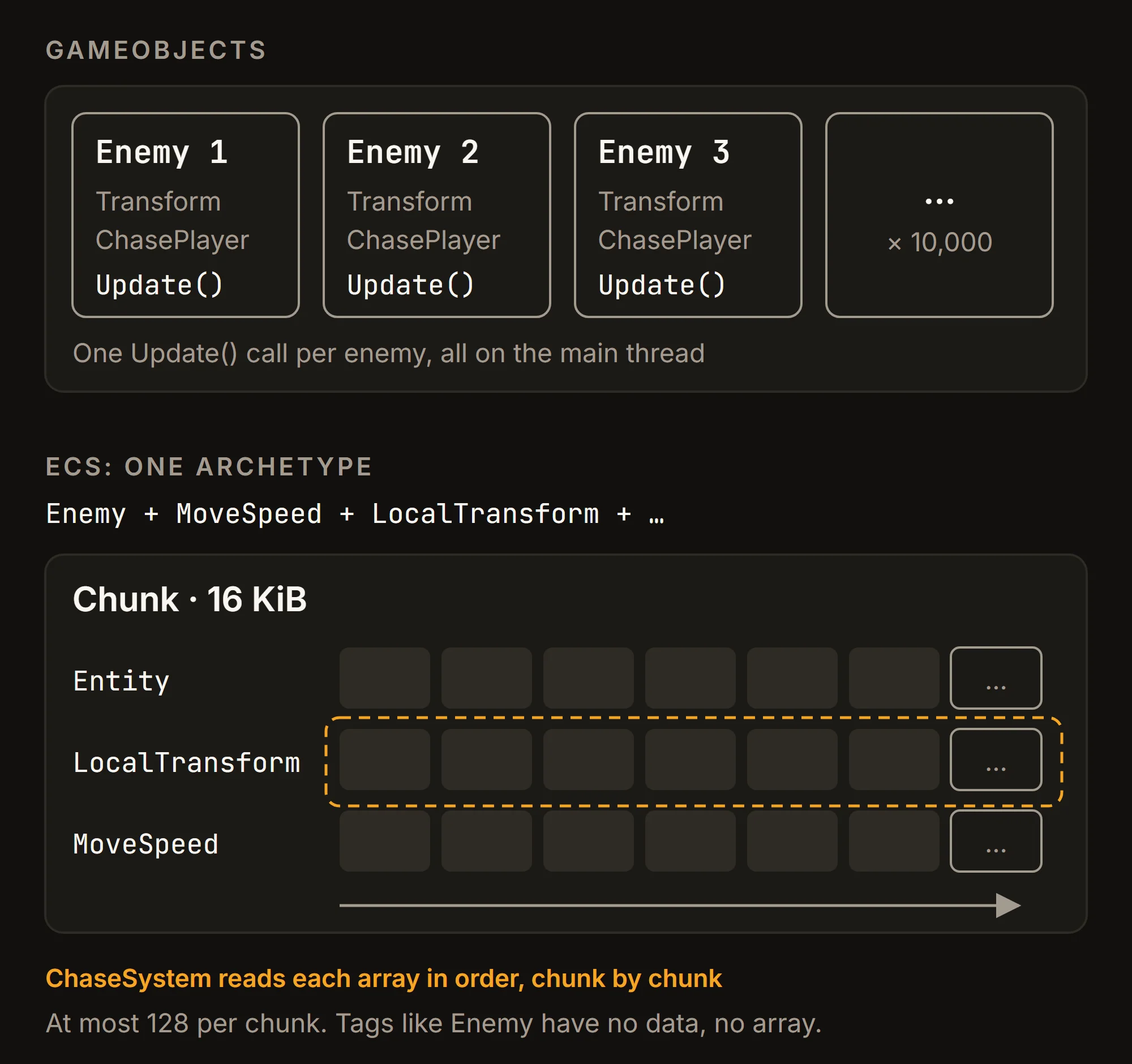
A system that moves enemies walks these arrays from start to end. A chunk holds at most 128 entities, and the chunk allocation page notes that cache misses happen when a system jumps from one chunk to the next. Larger entities fit fewer per chunk, but a full chunk still lets the system read many enemies in a row before each jump.
Components and baking for the horde
You do not create enemies in code from scratch. You build them in the Editor as usual and let baking convert them. The baking overview describes it as converting GameObject data in the Editor (authoring data) into entities. The GameObjects to bake go into a subscene: ECS uses subscenes instead of scenes, because Unity's core scene system is incompatible with ECS.
To set up the project, install the Entities and Entities Graphics packages in the Package Manager. Entities Graphics renders entities that have a mesh and a material, so the enemy prefab can keep its MeshRenderer.
The enemy prefab gets one authoring component. Its Baker runs during baking and adds the ECS components:
using Unity.Entities;
using UnityEngine;

public struct Enemy : IComponentData { }
public struct MoveSpeed : IComponentData { public float Value; }

public class EnemyAuthoring : MonoBehaviour
{
    public float Speed = 3f;

    class Baker : Baker<EnemyAuthoring>
    {
        public override void Bake(EnemyAuthoring authoring)
        {
            var entity = GetEntity(TransformUsageFlags.Dynamic);
            AddComponent<Enemy>(entity);
            AddComponent(entity, new MoveSpeed { Value = authoring.Speed });
        }
    }
}
TransformUsageFlags.Dynamic tells baking that this entity moves at runtime, so it keeps a LocalTransform. A Baker is where the MonoBehaviour fields turn into component data.
The spawner works the same way. A SpawnerAuthoring object in the subscene holds a reference to the enemy prefab, and its baker turns that reference into an entity prefab:
public struct Spawner : IComponentData
{
    public Entity Prefab;
    public int Count;
    public float Radius;
}

// In SpawnerAuthoring's Baker:
var entity = GetEntity(TransformUsageFlags.None);
AddComponent(entity, new Spawner
{
    Prefab = GetEntity(authoring.EnemyPrefab, TransformUsageFlags.Dynamic),
    Count = authoring.Count,
    Radius = authoring.Radius
});
This mirrors the prefab instantiation example in the Entities manual.
Spawning thousands of enemies
The snippets from here on leave out the using lines; they need Unity.Entities, Unity.Mathematics, Unity.Transforms, Unity.Collections and Unity.Burst, and Random means Unity.Mathematics.Random.
The player is often a regular GameObject with its own controller, camera and input. In this post it stays one, and a small script copies its position into a component every frame. This bridge is a simple design I chose for the example, not an official Unity pattern:
public struct PlayerPosition : IComponentData { public float3 Value; }

public class PlayerPositionSync : MonoBehaviour
{
    EntityManager entityManager;
    Entity playerEntity;

    void Start()
    {
        entityManager = World.DefaultGameObjectInjectionWorld.EntityManager;
        playerEntity = entityManager.CreateEntity(typeof(PlayerPosition));
    }

    void Update()
    {
        entityManager.SetComponentData(playerEntity, new PlayerPosition { Value = transform.position });
    }
}
The timing works out: ECS simulation systems update at the end of the player loop's Update phase, the phase in which MonoBehaviour.Update runs, so they see this frame's position.
The spawn system creates a wave on a ring around the player whenever no enemies are left. Here is its OnUpdate method:
[BurstCompile]
public void OnUpdate(ref SystemState state)
{
    var enemies = SystemAPI.QueryBuilder().WithAll<Enemy>().Build();
    if (!enemies.IsEmpty) return;

    var spawner = SystemAPI.GetSingleton<Spawner>();
    var center = SystemAPI.GetSingleton<PlayerPosition>().Value;
    var random = Random.CreateFromIndex(wave++);
    var instances = state.EntityManager.Instantiate(spawner.Prefab, spawner.Count, Allocator.Temp);

    foreach (var entity in instances)
    {
        float angle = random.NextFloat(0f, 2f * math.PI);
        var offset = new float3(math.cos(angle), 0f, math.sin(angle)) * spawner.Radius;
        SystemAPI.GetComponentRW<LocalTransform>(entity).ValueRW.Position = center + offset;
    }
}
Instantiate with a count creates all the copies in one call, each with the prefab's components and values. The method belongs to EnemySpawnSystem, a partial struct that implements ISystem and keeps the uint wave counter; its OnCreate calls state.RequireForUpdate<Spawner>() and state.RequireForUpdate<PlayerPosition>(), so it never runs before both exist. The official HelloCube Prefabs sample uses the same shape.
Chasing the player with a parallel job
Now the part that replaces ten thousand Update calls. The system reads the player position once, then schedules one job for all enemies:
public partial struct ChaseSystem : ISystem
{
    public void OnCreate(ref SystemState state) => state.RequireForUpdate<PlayerPosition>();

    [BurstCompile]
    public void OnUpdate(ref SystemState state)
    {
        new ChaseJob
        {
            Target = SystemAPI.GetSingleton<PlayerPosition>().Value,
            DeltaTime = SystemAPI.Time.DeltaTime
        }.ScheduleParallel();
    }
}
The job holds the per-enemy logic. IJobEntity builds its query from the Execute parameters, and [WithAll(typeof(Enemy))] limits it to enemies:
[BurstCompile]
[WithAll(typeof(Enemy))]
public partial struct ChaseJob : IJobEntity
{
    public float3 Target;
    public float DeltaTime;

    void Execute(ref LocalTransform transform, in MoveSpeed speed)
    {
        float3 toTarget = Target - transform.Position;
        toTarget.y = 0f;
        float3 direction = math.normalizesafe(toTarget);
        transform.Position += direction * speed.Value * DeltaTime;
        transform.Rotation = quaternion.LookRotationSafe(direction, math.up());
    }
}
ref marks data the job writes and in marks data it only reads, which lets the job scheduler run other jobs that read MoveSpeed at the same time. ScheduleParallel splits the work by chunk across worker threads, and [BurstCompile] compiles the job to native code. math.normalizesafe returns zero instead of NaN when an enemy stands exactly on the player.
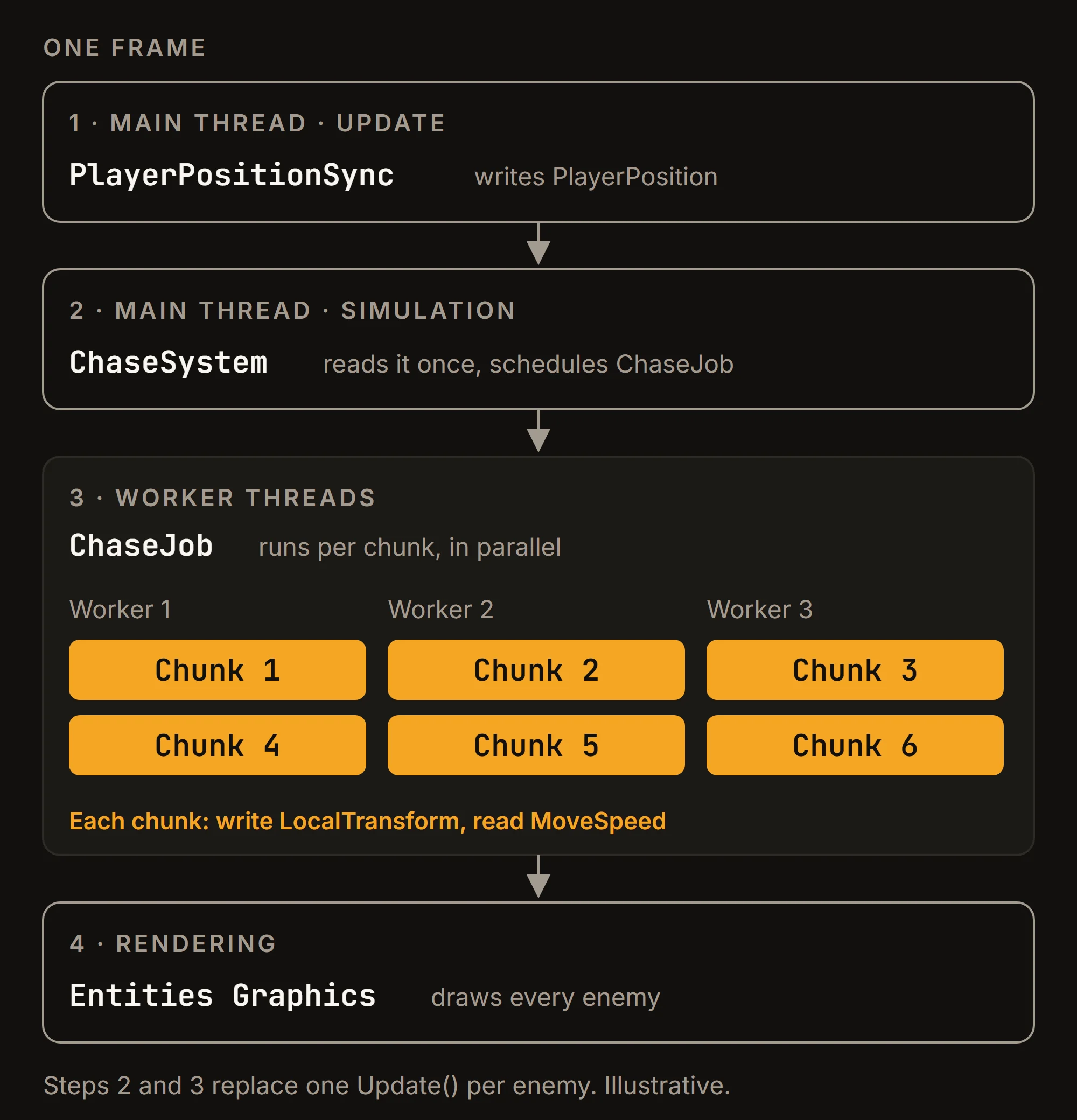
The script from the first section and this job do the same math. What changed is the shape: one call per frame instead of one per enemy, data read in order from chunks, and the work spread over every core.
Removing enemies without breaking the frame
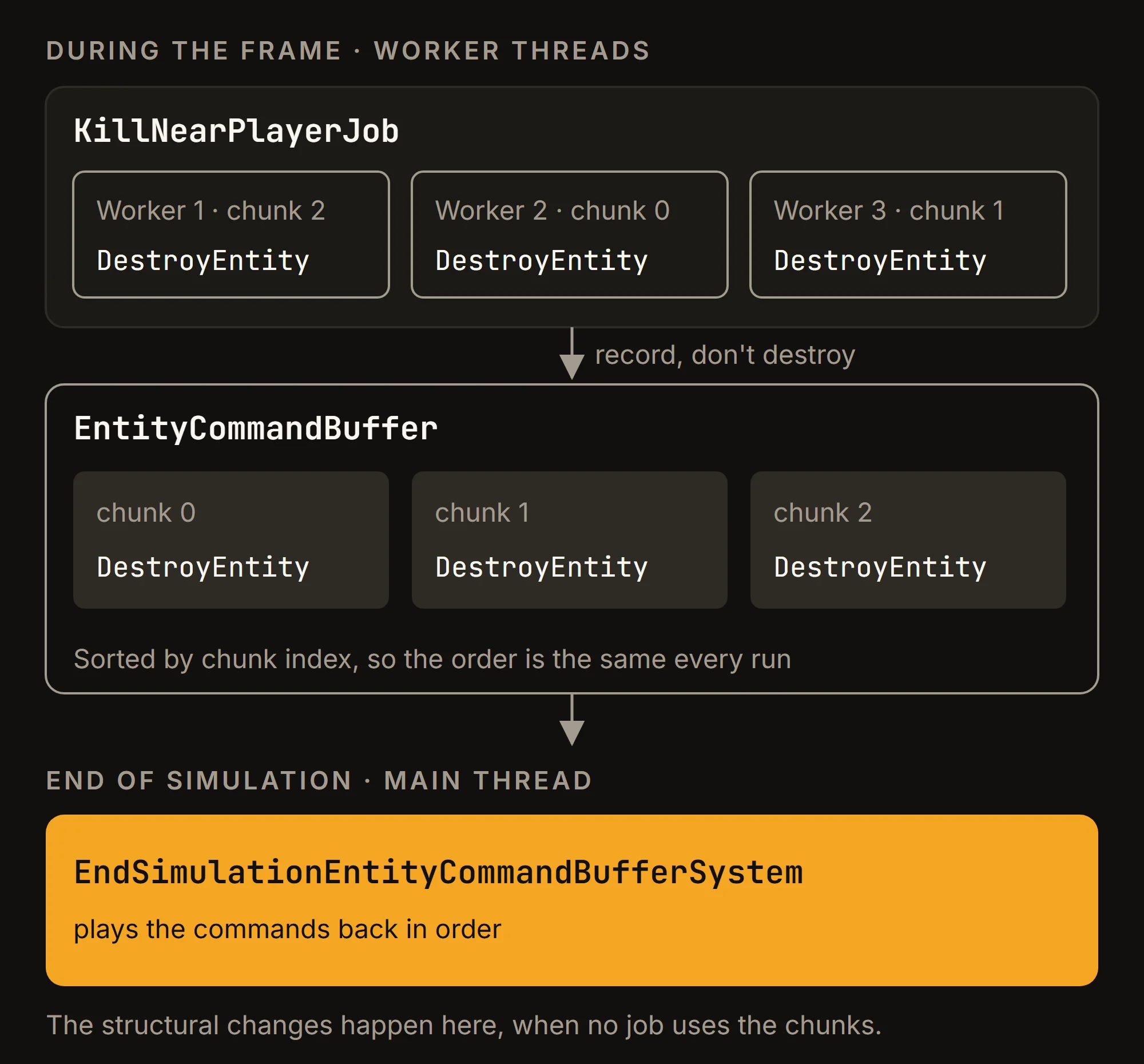
Enemies die. In ECS, destroying an entity is a structural change, like creating one or adding and removing components. The structural changes page says they can be resource-intensive, run only on the main thread, and may move entities between chunks. A job running on a worker thread therefore cannot destroy an entity directly.
Instead, the job records the command in an EntityCommandBuffer (ECB), and a system plays the commands back later on the main thread. Here a simple "aura" around the player kills every enemy that comes too close, standing in for real combat:
[BurstCompile]
[WithAll(typeof(Enemy))]
public partial struct KillNearPlayerJob : IJobEntity
{
    public float3 Center;
    public float RadiusSq;
    public EntityCommandBuffer.ParallelWriter Ecb;

    void Execute([ChunkIndexInQuery] int chunkIndex, Entity entity, in LocalTransform transform)
    {
        if (math.distancesq(transform.Position, Center) < RadiusSq)
            Ecb.DestroyEntity(chunkIndex, entity);
    }
}
The system that schedules it takes the buffer from the end-of-simulation ECB system:
var ecbSingleton = SystemAPI.GetSingleton<EndSimulationEntityCommandBufferSystem.Singleton>();
new KillNearPlayerJob
{
    Center = SystemAPI.GetSingleton<PlayerPosition>().Value,
    RadiusSq = 2f * 2f,
    Ecb = ecbSingleton.CreateCommandBuffer(state.WorldUnmanaged).AsParallelWriter()
}.ScheduleParallel();
ChunkIndexInQuery is the sort key: commands recorded from parallel threads play back in a fixed order. The pattern matches the official HelloCube RandomSpawn sample.
When every enemy is gone, the spawn system's query is empty again and the next wave appears.
To see it working, open the Entities windows under Window > Entities (Hierarchy, Systems, Components and Archetypes), and the Profiler to see the jobs on the worker threads.
Alternatives when full ECS is too much
ECS is a different way to build a game, not a setting you switch on. If only the horde is slow, these smaller steps may be enough:
- Custom update manager. One
MonoBehaviourkeeps a list of enemies and calls a plain method on each, which removes the per-object callback overhead described in the custom update manager page. Everything still runs on the main thread. - Jobs and Burst on GameObjects.
IJobParallelForTransformmoves transforms from aTransformAccessArrayon worker threads, compiled with Burst. All transforms in one hierarchy go to a single worker thread, so keep enemies as root objects rather than children of one "Enemies" parent. - Instanced rendering. If drawing is the bottleneck,
Graphics.RenderMeshInstanceddraws many copies of one mesh in a call: up to 1023 instances, or 511 when the shader uses the world-to-object matrix. On URP, the GPU Resident Drawer drawsMeshRendererGameObjects with GPU instancing automatically; it needs the Forward+ path and compute shaders, and does not support OpenGL ES. - Object pooling. Spawning and destroying GameObjects wave after wave adds its own cost.
ObjectPool<T>reuses them instead.
These combine well: a pooled horde, moved by one Burst job and drawn with instancing, covers much of what ECS gives you, without subscenes or baking.
Limits and trade-offs
Before moving a game to ECS, check what it rules out:
- Rendering pipeline and platforms. Entities Graphics does not support the Built-in Render Pipeline or the Web platform. On URP it only supports the Forward+ path; Android needs Vulkan or OpenGL ES 3.1+, and iOS needs Metal.
- Animated characters. Mesh deformation for skinned meshes in Entities Graphics is experimental and not ready for production. A horde of animated humanoids needs another solution, such as vertex animation in the shader, or GameObjects.
- Physics. Collisions and queries between entities come from a separate ECS package, Unity Physics, with its own components and workflow.
- Workflow. Entity content lives in subscenes and goes through baking, and the code follows rules that ordinary C# does not: unmanaged structs, no class references in jobs, structural changes through command buffers. The whole team has to learn this, and in a typical setup the UI and audio stay on the GameObject side.
The common middle ground is a hybrid: ECS for the thousands of simple things (enemies, bullets, pickups), GameObjects for the player, the camera and the UI, with a small bridge like PlayerPositionSync between them.
Checklist
- Profile first. Move to ECS when the per-enemy
Updatecost or the main thread is the measured problem, not by default. - Try the smaller steps when only one system is slow: an update manager,
IJobParallelForTransform, instancing, pooling. - Check the limits: URP Forward+ or HDRP, no Web, no production-ready skinned animation in Entities Graphics.
- Model each enemy as a few small components; put the logic in
ISystemstructs with[BurstCompile]andIJobEntity. - Create and destroy entities through
EntityManager.Instantiateon the main thread or anEntityCommandBufferin jobs. - Start from the official EntityComponentSystemSamples and keep the player and UI as GameObjects.